
Geometry Dash Wave: The Hardest One-Button Game You’ll Keep Coming Back To
There’s a reason the wave mechanic in Geometry Dash has its own dedicated fanbase, its own speedrun community, and its own YouTube rabbit hole of reaction videos.
It’s not because it’s fun in the traditional sense. It’s because landing a clean run through a brutal wave section feels like winning something real.
What Is Geometry Dash Wave Unblocked?
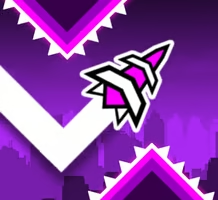
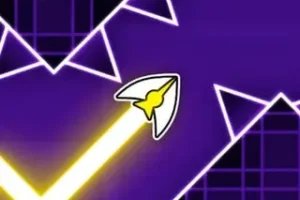
Geometry Dash Wave Unblocked is an arcade rhythm game built entirely around the wave mechanic from the original Geometry Dash series. Your character moves forward automatically in a constant zigzag pattern. Hold the button and the wave rises at an angle. Release it and gravity pulls it back down.
That one interaction is the whole game. Get your wave through the level without touching a single wall, spike, or rotating obstacle. One collision and you’re starting over.
The wave mechanic was first introduced in Geometry Dash version 1.9 by RobTop Games, created by Swedish developer Robert Topala. It quickly became the most talked-about and most feared mechanic in the entire game, showing up in official levels like Hexagon Force and Deadlocked specifically to push precision to its absolute limit.
Why This Mechanic Is Different From Everything Else
Most arcade games give you simple up-and-down controls. Tap to jump, hold to fly, that kind of thing. Wave mode breaks that expectation completely.
Your character doesn’t move in straight lines. It carves a continuous diagonal path that changes angle with every input. Holding too long sends you into the ceiling. Releasing too early drops you into the floor. Finding the rhythm between the two is what takes dozens of attempts to develop even on easier levels.
That’s exactly the same challenge you’re working with in Space Waves over at spacewavesgame.com — both games are built around mastering that same diagonal wave movement, just packaged differently. If you’ve put time into one, switching to the other immediately feels familiar.
Controls
Simple to explain, hard to execute consistently:
- Spacebar / Up Arrow: Hold to make the wave rise
- Release: Wave drops back down due to gravity
- Left Mouse Button: Same function as keyboard inputs
- Mobile Tap: Hold to rise, lift to drop
- P Key: Pause mid-level
The timing window on harder levels is measured in frames. A single frame of mistimed input at the wrong moment ends the run immediately.
Difficulty Levels and What to Expect
Geometry Dash Wave uses a face-based difficulty system that tells you exactly how much pain you’re signing up for before a run starts:
Easy (Blue) gives you wider corridors and gentler zigzag sections. This is where the mechanic starts making sense. Normal (Green) and Hard (Yellow) tighten the gaps and add more obstacle variety that demands actual pattern recognition. Harder (Orange) and Insane (Red) are where casual players typically hit a wall and the game stops being forgiving.
Then there are the Demon levels — purple, pink, and red demon tiers — which represent the hardest content the game has to offer. Extreme Demon levels are completed by a very small percentage of the playerbase worldwide, and finishing one is considered a genuine skill milestone in the community.
Practice Mode and How to Use It
One of the most useful features in Geometry Dash Wave is Practice Mode. You can place your own checkpoints at any point in a level, which means instead of restarting the entire thing every time you crash, you restart from the nearest checkpoint you placed.
The trick is using it properly. Don’t spam checkpoints everywhere — place them specifically at the sections that keep ending your runs. Work that section until it’s clean, move the checkpoint forward, and build momentum through the level piece by piece.
Trying to brute-force a hard level from the beginning without practice mode is how players waste hours on sections that could be isolated and learned in ten minutes.
Rhythm Is the Secret Weapon
Every level in Geometry Dash Wave is synced to a music track. The obstacle patterns line up with the beat, which means players who listen carefully have a genuine advantage over players who only watch the screen.
Once you internalize the music, your inputs start to naturally follow the rhythm. You stop reacting to what’s immediately in front of the wave and start anticipating what’s coming two beats ahead. That shift, from reacting to predicting, is what separates players who consistently clear levels from players who crash at the same spot every single time.
5 Tips That Actually Move the Needle
Tip 1: Start on Easy difficulty even if you think you’re already good at reflex games. The diagonal movement feels completely different from anything else and your first few attempts will be worse than you expect.
Tip 2: Use short, quick taps on open sections to keep the wave centered rather than holding the button and riding the ceiling or floor.
Tip 3: Place practice checkpoints right before the specific obstacle that keeps killing you, not at the beginning of the section. You want to practice the hard part, not the run-up to it.
Tip 4: Listen to the music before you focus on the visuals. Hum the track, feel where the beats land, then let that rhythm guide your inputs instead of reacting purely by sight.
Tip 5: If a level feels genuinely impossible after twenty attempts, drop to an easier one for a while. The muscle memory you build on easier wave sections transfers directly to harder ones and the improvement is faster than grinding the same impossible section repeatedly.
Developer Info
Geometry Dash Wave is built on the wave mechanic originally created by RobTop Games, the studio founded by Robert Topala in 2013. The original Geometry Dash launched that same year and the wave mode became one of its most iconic additions across subsequent updates. The standalone browser versions of Geometry Dash Wave bring that core mechanic directly to any device without downloads or installations.
Frequently Asked Questions
Is Geometry Dash Wave free to play? Yes, the browser version is completely free. Open it in any modern browser and the game loads instantly with no installation or account required.
How is Geometry Dash Wave different from regular Geometry Dash? Regular Geometry Dash uses multiple mechanics including jumping, flying, and ball mode across different sections. Geometry Dash Wave focuses exclusively on the wave mechanic, which means every level is built around that specific zigzag movement style. It’s more specialized and in many ways more demanding than the full game.
Can I play Geometry Dash Wave on mobile? Yes, the browser version supports touchscreen controls. Tap and hold to rise, lift your finger to drop. The experience is the same as desktop, though most players find a keyboard slightly more precise for harder levels.
Similar Games Worth Playing
Space Waves: same one-button zigzag mechanic, 33 difficulty-coded levels and three game modes including live racing. If this wave style clicked, spacewavesgame.com is where to go next.
Wave Road: another wave-based arcade game with obstacle courses that test the same timing and rhythm skills. Shorter sessions, different visual style, same core challenge.
Curve Rush: guide a ball through curved tracks using precise timing. The movement style is different from wave games but the same “one wrong move and you restart” intensity carries over completely.
Written by Jake Rivera