Space Waves: The One-Button Game That's Harder Than It Has Any Right to Be
Someone made a game with one button. You hold it to go up and release it to go down. That's genuinely the entire control scheme.
And yet Space Waves has over a million players, a rating pushing 9 out of 10 on major gaming platforms, and a community that argues about which demon level is the hardest with the kind of intensity usually reserved for actual competitive gaming.
There's a lesson somewhere in there about simplicity and depth, but you'll figure it out after your 30th crash on Level 7.
What Is Space Waves Unblocked?
Space Waves Unblocked is a one-button rhythm arcade game where you control a neon arrow through a series of obstacle-filled space tunnels. The arrow moves forward automatically. You manage its vertical position by holding or releasing a single button.
That's it. No steering, no jumping, no special moves, no combo system. Just one input and 33 levels designed to make that one input feel completely insufficient.
The game was released in April 2024 by Xelluf, published under do.games, and it quickly became one of the most played browser arcade games of the year. The core mechanic is directly inspired by the wave mode from Geometry Dash, which already had players spending hours on a single section. Space Waves strips everything else away and makes the wave the whole game.
You can find it and play it free at spacewavesgame.com without downloading a single file or creating any account.
The Arrow, the Tunnel and How It All Works
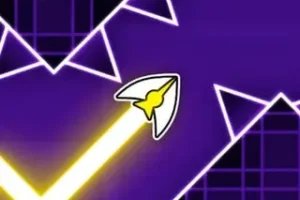
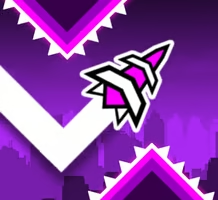
Your character is a small arrow-shaped icon that constantly moves to the right across the screen. The tunnel it moves through is filled with walls, rotating gears, spike formations, and narrow corridors that require precise vertical positioning to survive.
Hold the control button and the arrow flies upward. Release it and gravity pulls it back down. The goal every level is to reach the finish line on the right side of the screen without the arrow touching anything along the way.
One collision and you restart the level immediately. No health bar, no second chance, no gradual damage. One hit, back to the beginning.
The movement system has one layer of complexity that catches everyone off guard at first. The arrow doesn't fly in a straight horizontal line. It moves in a natural zigzag pattern because of how gravity and the upward thrust interact. Holding the button too long sends it into the ceiling. Tapping too lightly means it drops faster than expected. Finding the rhythm of the zigzag, timing your inputs to ride the wave through gaps rather than fighting against the motion, is the core skill the entire game is built around.
Controls
The input options are flexible enough to work on any device:
- Left Mouse Button: Click and hold to rise, release to fall
- Spacebar: Same mechanic on keyboard
- W Key: Alternative keyboard control
- Up Arrow Key: Also works identically
- Mobile Tap: Hold finger on screen to fly up, lift to drop
All four keyboard options work the same way and can be swapped at any point mid-game. Most players naturally gravitate toward either spacebar or mouse click depending on their setup.
All 33 Levels — What to Expect From Each Difficulty
The 33 levels aren't arranged in strict difficulty order. They're split into worlds and within each world the difficulty is somewhat randomized, which means you can't always predict what the next level will throw at you based on its position in the menu.
What you can rely on is the color-coded difficulty indicator attached to each level before you start.
Green — Easy: Wide tunnels, gentle curves, minimal obstacles. These levels exist to teach you the zigzag movement before adding pressure. Most players clear greens within a few attempts once the control mechanic clicks.
Yellow — Medium: Obstacle density increases noticeably. Gaps between hazards narrow and the rhythm required becomes more demanding. Clearing yellows consistently means your timing is developing properly.
Orange — Hard: Sharper angles, faster obstacle sequences, and wall configurations that punish hesitation. Orange levels require anticipating what's coming rather than reacting to what's already in front of the arrow.
Red — Demon: These are the levels that send players to the community to ask if they're actually possible. Micro-precision inputs, extremely tight corridors, and obstacle patterns that need to be memorized section by section. Clearing a red level feels genuinely different from clearing anything below it.
You can start on any level from the beginning. There's no forced progression locking red levels behind completing the greens first. This is worth knowing because jumping straight to a demon level early on is the fastest way to understand what the game is actually capable of demanding.
Three Game Modes and What Makes Each One Different
Classic Mode
The primary way to experience Space Waves. Work through each world and clear every level to build your full completion. Classic Mode is also where Practice Rounds live.
Practice Rounds give you checkpoints at key points in a level, letting you restart from the midpoint of a tough section instead of going all the way back to the beginning. The number of practice attempts is limited per level, so using them specifically on the sections that consistently end your runs is smarter than burning through them randomly trying to complete the whole thing.
Endless Mode
No finish line, no level structure, just a continuously generated tunnel that keeps throwing new obstacles until you crash. Every run in Endless Mode is different because the track is never the same twice.
Endless Mode tests a purer form of the zigzag skill because there's no memorization advantage. You can't learn a specific pattern and run it clean. Everything is decided in real time by raw reaction speed and muscle memory built up across dozens of Classic Mode attempts.
Your score is how far you travel. Chasing a distance record in Endless Mode becomes its own separate obsession from clearing levels in Classic.
Race Mode
Live competition against real players on the same track at the same time. The goal is simple: reach the finish line before everyone else.
Any collision during Race Mode sends your arrow back to the start of the race, not just the nearest checkpoint. That rule alone changes how the mode feels compared to Classic. Playing it safe becomes a legitimate strategy because one avoidable crash near the finish can cost you a race that was already won.
Race Mode is where Space Waves takes on a competitive dimension that the other two modes don't have. Watching an opponent crash near the finish while you're still alive is a specific kind of satisfaction that keeps players coming back.
Customization — Arrow Skins, Colors and Daily Rewards
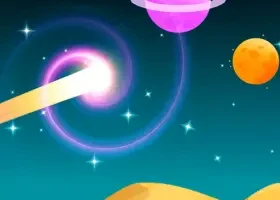
Completing levels earns Energy Points based on your performance. These points are the in-game currency for the shop, where you can buy custom arrow skins, new colors, and glowing surfing trail effects that follow your arrow through the tunnel.
None of the cosmetics change how the game plays. The physics, the hitboxes, the arrow's movement — all of it stays identical regardless of what skin you're using. But swinging through a tight orange level with a glowing custom trail does feel noticeably different from the default, and for a lot of players that's enough reason to grind the shop.
A daily lucky spin is also available every 24 hours, giving bonus Energy Points for logging in consistently. It's worth checking regularly during a heavy play session.
Why Space Waves Spread the Way It Did
The game launched quietly in April 2024 and didn't rely on any marketing push to build its audience. It spread the way most genuinely good browser games spread — someone played it, got stuck on a level, showed a friend, and the friend immediately had to try.
The instant restart system is a big part of that. A crash in Space Waves costs about half a second. There's no loading screen, no score recap, no menu navigation between you and the next attempt. You crash, you're already back at the start, and you're already thinking about what to do differently.
That friction-free retry loop is what keeps the "just one more try" feeling going far longer than the actual difficulty would suggest. A level that genuinely seems impossible on attempt five becomes approachable by attempt twenty, and by attempt forty your fingers are doing things your brain can barely keep up with.
6 Tips That Actually Help
Tip 1: Work through at least three or four green levels before touching yellow ones. The zigzag motion needs a few runs to become instinct rather than something you're actively thinking about.
Tip 2: On flat open sections between obstacle clusters, use short rapid taps instead of holding the button down. Short taps keep the arrow near the center of the tunnel where you have the most room to react.
Tip 3: Look ahead of the arrow, not at it. Your brain processes the upcoming obstacles better when your focus is two or three gaps ahead rather than on the arrow's current position.
Tip 4: Don't fight the zigzag. Time your inputs to ride the natural wave motion through gaps instead of trying to hold a straight line. The game is designed around the zigzag, not against it.
Tip 5: Use Practice Round checkpoints only on the specific section that keeps ending your run, not from the beginning. Spending all your practice attempts just getting to the hard part is a waste of the system.
Tip 6: Close extra browser tabs before playing. Space Waves runs on WebGL and competes with other tabs for GPU resources. Background tabs can cause frame drops at exactly the wrong moment, and in a game decided by single-frame timing those drops matter.
Frequently Asked Questions
Is Space Waves free to play? Yes, completely free. Open spacewavesgame.com in any modern browser and the game loads directly with nothing to install, no account required, and no hidden costs anywhere in the experience.
Does Space Waves work on mobile? Yes. The tap controls work on touchscreen devices and the game is optimized for mobile browsers. The gameplay experience is the same whether you're on a desktop with a keyboard or a phone with a touchscreen.
What happens if I crash during Race Mode? Your arrow resets to the starting line of the race, not just a nearby checkpoint. Everyone else in the race keeps going from wherever they are, so a late crash can cost you a significant position in the standings depending on how far along the race is.
Is there a difference between the arrow skins in the shop? No. All skins, colors, and trail effects are purely cosmetic. None of them affect the arrow's physics, hitbox, movement speed, or any gameplay mechanic. The game is the same regardless of what you have equipped.
Can I play any level from the start or do I need to unlock them? All 33 levels are available from the moment you open the game. There's no unlock progression. Pick any level at any difficulty and start playing immediately.
Written by Jake Rivera